RevenueCat
Attribute mobile subscription revenue to referrals — no conversion code required.
How It Works
Connect your RevenueCat account to Growth Rail by registering a webhook in your RevenueCat dashboard. When a referred user makes an in-app purchase, RevenueCat fires a single event that carries the full attribution:
Growth Rail listens for INITIAL_PURCHASE and NON_RENEWING_PURCHASE events from RevenueCat. When one arrives, Growth Rail reads the gr_ucc subscriber attribute you set at install time to identify the referrer, uses RevenueCat's app_user_id to identify the referee, records the purchase price as revenue, and triggers the referrer's reward — all from a single webhook event, with no conversion code required in your checkout flow.
getCapturedReferralCode() to retrieve the incoming referral code from the deep link.Get your webhook endpoint URL
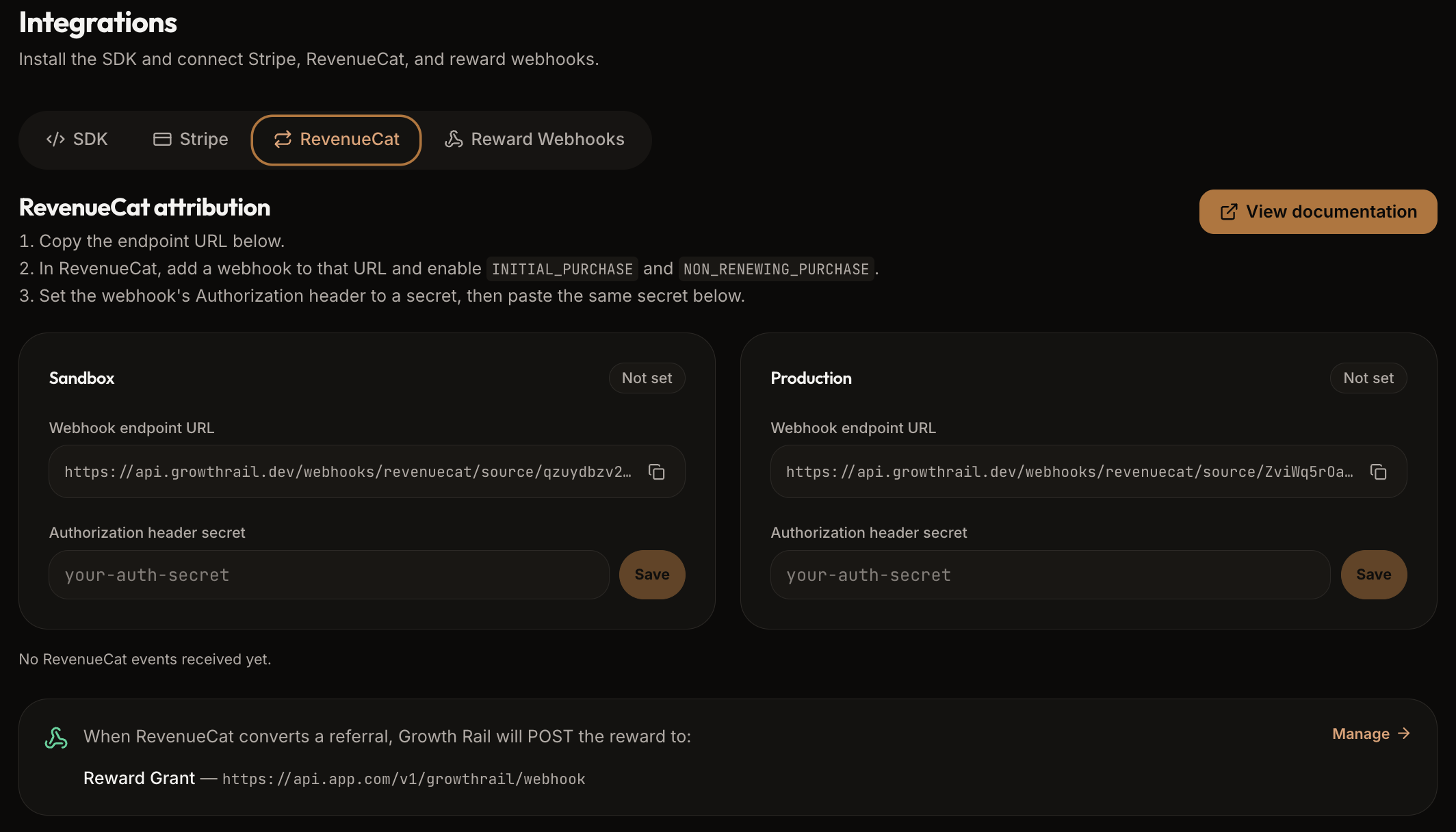
In the Growth Rail dashboard, open Integrations from the sidebar and select the RevenueCat tab. It shows your project's Sandbox and Production webhook endpoint URLs, each with a copy button.
Add a webhook in RevenueCat
In your RevenueCat dashboard, go to Integrations → Webhooks and click + New webhook. Paste the Growth Rail URL from Step 1 as the endpoint. Then set the Authorization header value to the shared secret shown in the Growth Rail dashboard (open Integrations from the sidebar and select the RevenueCat tab). Finally, enable exactly these two event types:
| Event | What it triggers in Growth Rail |
|---|---|
INITIAL_PURCHASE | Attributed conversion recorded; referrer reward fires |
NON_RENEWING_PURCHASE | Attributed conversion recorded; referrer reward fires |
Repeat this for both sandbox and production RevenueCat projects using their respective Growth Rail endpoint URLs.
Save the shared secret in Growth Rail
Return to the Growth Rail dashboard, open Integrations from the sidebar, select the RevenueCat tab, and paste the same secret into the Authorization secret field for the matching environment (sandbox or production).
Authorization header on every incoming RevenueCat request using this secret. Without it, events are rejected.Set the attribution attribute in your mobile app
After the user logs in via Purchases.logIn(userId), retrieve the captured referral code using the Growth Rail SDK and store it as the gr_ucc subscriber attribute. RevenueCat will include this attribute in every subsequent webhook event for that user.
import Purchases from 'react-native-purchases';
import { useGrowthRail } from '@growth-rail/react-native';

const { getCapturedReferralCode } = useGrowthRail();

// Call this after Purchases.logIn(userId) resolves
const grUcc = await getCapturedReferralCode();
if (grUcc) {
  await Purchases.setAttributes({ gr_ucc: grUcc });
}
The React Native getCapturedReferralCode() is async — always await it. The referee is identified automatically by RevenueCat's app_user_id (the value you pass to Purchases.logIn), so no additional user-identity attribute is needed.
Subscriber Attributes Reference
- Growth Rail only needs the Authorization header secret you configure in RevenueCat — never your RevenueCat API key. Do not paste your RevenueCat API key into Growth Rail or share it with any third party.
- Reward reversal on refunds or subscription cancellations (
CANCELLATION/EXPIRATIONevents) is not yet supported. Rewards that were already granted will not be automatically revoked when a subscription lapses. This feature is coming soon.