Webhooks
Webhooks deliver real-time reward events from Growth Rail to your backend. When a referral reward is granted, Growth Rail POSTs a signed JSON payload to your configured endpoint so you can credit users, send notifications, or trigger any downstream action.
How Webhooks Work
Creating a Webhook
In the Growth Rail dashboard, go to Integrations → Reward Webhooks, then click Add Webhook.
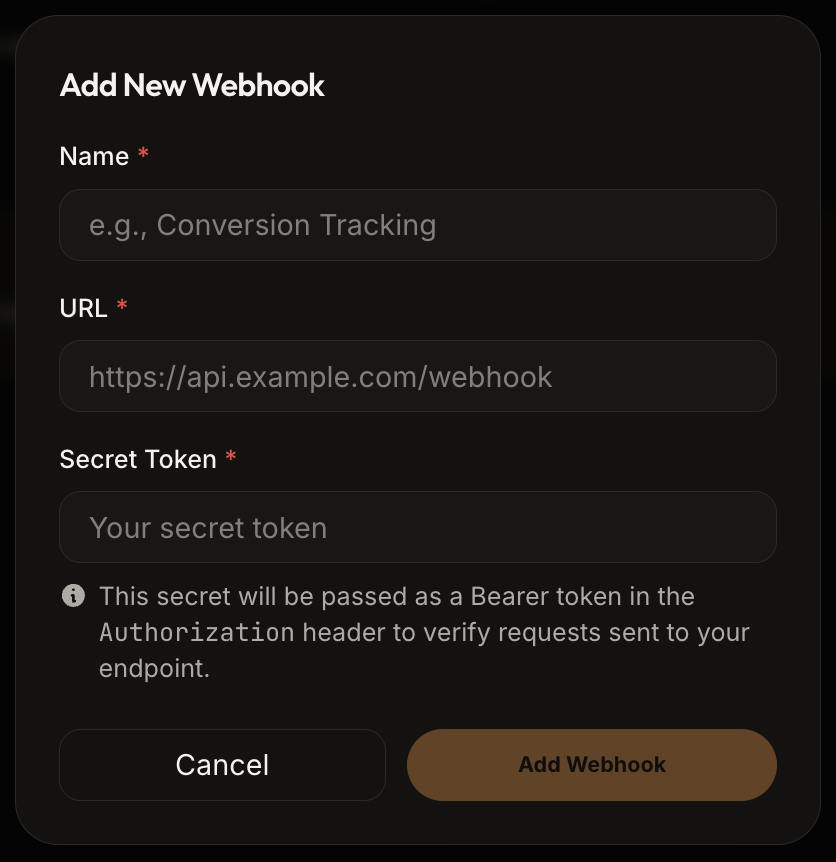
| Field | Required | Description |
|---|---|---|
name | Yes | A descriptive label (e.g. "Credits Service", "Notification Handler"). |
url | Yes | The HTTPS endpoint on your server that receives POST requests. |
secret | Yes | A shared secret sent as a Bearer token in the Authorization header. |
enabled | No | Whether this webhook is active. Defaults to true. Disabled webhooks receive no events. |
Webhook Payload
Growth Rail sends a POST request with Content-Type: application/json and your secret in the Authorization: Bearer header.
| Header | Value |
|---|---|
X-GrowthRail-Delivery-Id | Stable delivery identifier for deduplication |
Authorization | Bearer <secret> |
{
  "event": "user_signup",
  "referrerId": "user_alice",
  "refereeId": "user_bob",
  "rewardClaimedAt": "2025-03-01T10:00:00.000Z",
  "trackingId": "3fa85f64-5717-4562-b3fc-2c963f66afa6",
  "rewardStatus": "Completed",
  "projectId": "proj_k8xn2m",
  "projectName": "MyApp Production",
  "campaignId": "cam_r3f9t2"
}| Field | Type | Description |
|---|---|---|
event | string | The trigger event name that caused the reward (e.g. user_signup). |
referrerId | string | The clientProvidedId of the referrer. Use this to credit the reward. |
refereeId | string | The clientProvidedId of the new user who was referred. |
rewardClaimedAt | string | ISO 8601 UTC timestamp of when the reward was granted. |
trackingId | string | UUID of the referral tracking record. Use as an idempotency key. |
rewardStatus | string | Always "Completed" when the webhook fires. |
projectId | string | The project's uniqueId. Useful when sharing one endpoint across projects. |
projectName | string | Human-readable project name. |
campaignId | string | The campaign's uniqueId. |
Handling Webhooks
Your endpoint must return a 2xx HTTP response promptly (within a few seconds). Verify the secret, acknowledge immediately, then process asynchronously.
router.post('/webhooks/growth-rail', express.json(), async (req, res) => {
  // 1. Verify the webhook secret
  const authHeader = req.headers.authorization;
  if (authHeader !== `Bearer ${process.env.GR_WEBHOOK_SECRET}`) {
    return res.sendStatus(401);
  }

  // 2. Always acknowledge receipt immediately
  res.sendStatus(200);

  // 3. Process the reward asynchronously using trackingId as idempotency key
  const { referrerId, trackingId, rewardStatus } = req.body;
  if (rewardStatus === 'Completed') {
    // Your business logic here — credit the referrer, send a notification, etc.
  }
});
Verifying Webhook Authenticity
Growth Rail sends your webhook secret as a Bearer token in the Authorization header. Always compare it with the secret configured for that webhook before processing the payload.
function verifyWebhook(req, res, next) {
  const expected = 'Bearer ' + process.env.GR_WEBHOOK_SECRET;
  const received = req.headers.authorization;

  if (received !== expected) {
    console.warn('Invalid webhook authentication');
    return res.sendStatus(401);
  }

  next();
}

// Apply to your webhook route
app.post('/webhooks/growth-rail', verifyWebhook, express.json(), handler);Idempotency
Webhooks may be delivered more than once due to network retries or redelivery from the dashboard. Always use the trackingId field as an idempotency key in your database before processing any reward — check whether the trackingId has already been handled and skip if so.
Retry Behavior
Growth Rail retries transient failures. Authentication and other permanent client errors are dead-lettered immediately so a broken secret does not repeatedly hit your endpoint.
| Property | Value |
|---|---|
| Max attempts | 5 (initial + 4 retries) |
| Retry interval | Exponential backoff with jitter, starting at about 5 seconds |
| Timeout | 10 seconds total — respond quickly |
| Manual retry | Available from the dashboard or via POST /webhooks/logs/{logId}/retry |
200 immediately and process the reward asynchronously. Long-running webhook handlers will cause timeouts and unnecessary retries.Monitoring & Logs
The dashboard shows delivery logs for each webhook with full details:
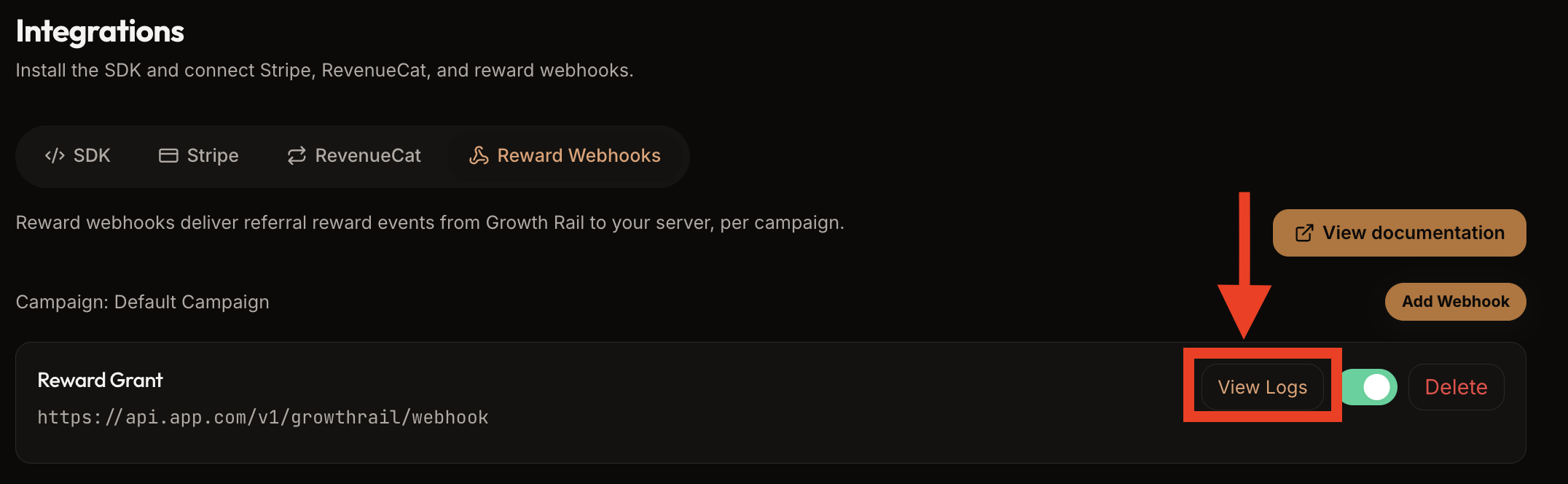
| Log Field | Description |
|---|---|
| Timestamp | When the delivery attempt was made |
| Event type | The trigger event name |
| HTTP status | Status code returned by your endpoint |
| Response time | Round-trip time in milliseconds |
| Success | Whether the delivery was successful |
Managing Webhooks
All webhook management is available from the Growth Rail dashboard under Integrations → Reward Webhooks.
| Action | How |
|---|---|
| Disable | Toggle the webhook off to pause delivery without deleting it. Re-enable anytime. |
| Retry a failed delivery | Click the retry button on any failed log entry in the delivery logs. |
| Delete | Permanently removes the webhook and all its delivery logs. |
| Edit | Update the endpoint URL, name, or secret at any time. |
Best Practices
trackingId for idempotency — webhooks may be delivered more than once