Project Setup
A Project is the top-level container for your Growth Rail integration. Everything — users, campaigns, reward rules, and webhooks — belongs to a project. This guide walks you through creating, configuring, and securing your project.
Architecture Overview
Growth Rail uses a hierarchical structure to organize your data. Understanding this hierarchy is key to setting up your integration correctly.
| Entity | Scope | Description |
|---|---|---|
| Organization | Account-wide | Your top-level account. Manages billing, team members, and projects. All projects live under one org. |
| Project | Per app / environment | An isolated container with its own secret, users, campaigns, and webhooks. Create one per app or per environment (dev/staging/prod). |
| Campaign | Per project | Defines the referral UI experience — trigger button, sharing modal, and new-user welcome banner. |
| App Users | Per project | Your end users, each with a unique referral code. Isolated per project — a user in "Production" is separate from a user in "Staging". |
Creating a Project
You can create a project during onboarding or at any time from the dashboard.
Choose a platform type
Select whether your project targets Web App or Mobile App. This choice determines which configuration options appear (e.g., mobile projects get App Store / Play Store URL fields). The platform type cannot be changed after creation.
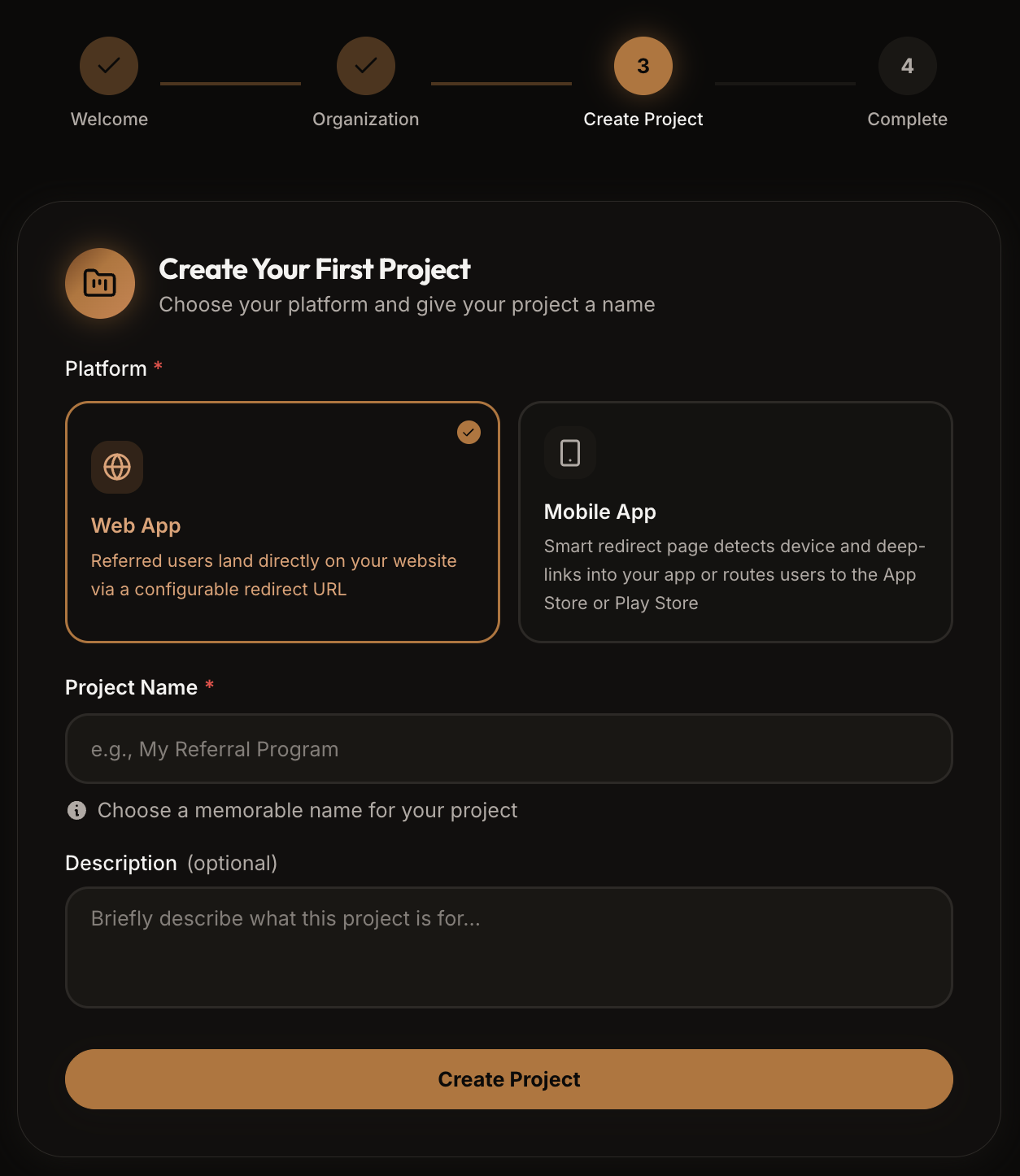
Web App
For websites and web apps. Referral links redirect to your configured URL. The SDK uses cookies for tracking and renders UI components in the browser DOM.
Mobile App
For React Native and native iOS / Android apps. Supports deep linking, install referrer / fingerprint matching for deferred deep links, and automatic mobile referral UI.
Name and describe your project
Give your project a clear, descriptive name. If you run multiple environments, include the environment in the name to avoid confusion.
| Field | Type | Description |
|---|---|---|
name | string | A human-readable name (e.g. "MyApp - Production"). Required. |
description | string | Optional. A short description to help identify the project's purpose. |
uniqueId | string | Auto-generated identifier (e.g. proj_k8xn2m). Used in all REST API paths. |
appType | "Web" | "Mobile" | Platform type (Web App or Mobile App). Set during creation and cannot be changed. |
Get your Project Secret
After creation, your project is assigned a Project Secret (prefixed with sk_). This is the credential your SDK uses on every request. You'll find it under Project Settings in the dashboard.
# Your project secret looks like this:
sk_a1b2c3d4e5f6g7h8i9j0k1l2m3n4o5p6
Project Secret
The Project Secret is the credential the SDK sends on every API request in the X-GrowthRail-ProjectSecret header. Growth Rail uses it to identify which project the request belongs to and to verify the request origin.
# .env (recommended approach)
GROWTH_RAIL_PROJECT_SECRET=sk_a1b2c3d4e5f6g7h8i9j0...

# Access in your app
process.env.GROWTH_RAIL_PROJECT_SECRETReferral Redirect Link
The Referral Redirect Link is the base URL that Growth Rail appends referral parameters to when generating shareable links for your users. Set this in the dashboard under Project Settings.
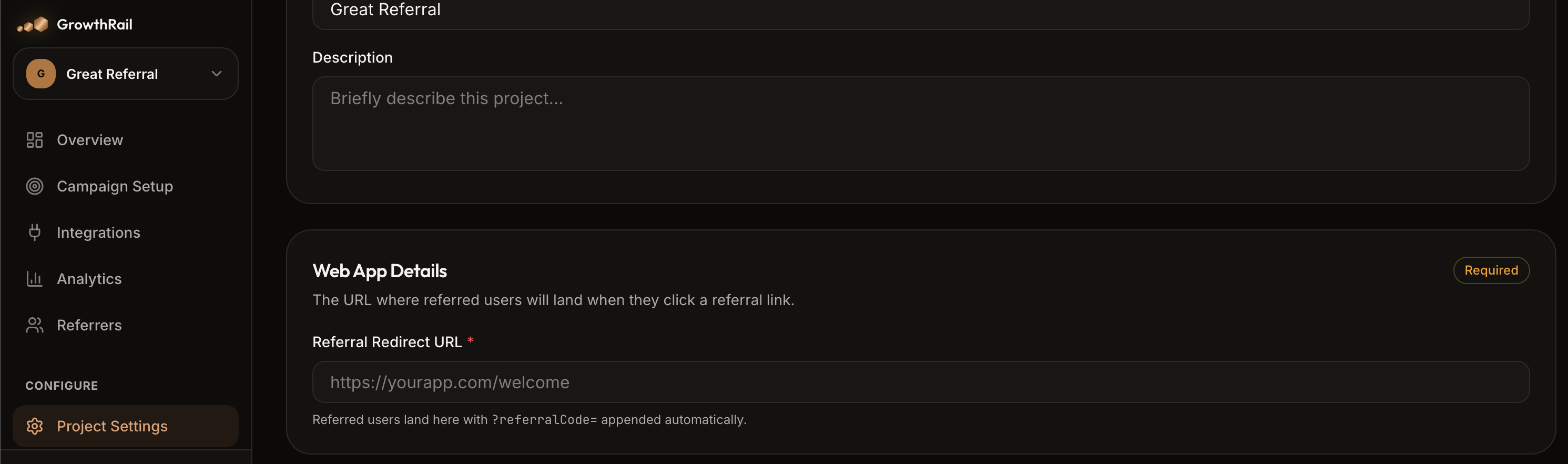
This URL should point to your signup or landing page — the page where new users land when following a referral link. When the SDK initializes on that page, it automatically detects the referralCode query parameter and calls trackReferral() behind the scenes.
Mobile App Configuration
If your project type is Mobile, you'll need to configure additional app details for deep linking and store redirects. Navigate to Project Settings and fill in your app information.
| Field | Description | Example |
|---|---|---|
appName | Your app's display name | MyApp |
appStoreUrl | iOS App Store listing URL | https://apps.apple.com/app/id123456 |
playStoreUrl | Google Play Store listing URL | https://play.google.com/store/apps/details?id=com.yourapp |
iconUrl | App icon (max 10 MB, drag-and-drop upload) | Used in referral link previews |
SDK Installation
With your project configured, install the Growth Rail SDK in your application.
npm install @growth-rail/react @growth-rail/core
# or
yarn add @growth-rail/react @growth-rail/core
# or
pnpm add @growth-rail/react @growth-rail/core
Initialize the SDK
// main.tsx or App.tsx
import { GrowthRailProvider } from '@growth-rail/react';

function App() {
  const currentUser = useAuth(); // your auth hook

  return (
    <GrowthRailProvider
      projectSecretKey={import.meta.env.VITE_GROWTH_RAIL_SECRET}
      userId={currentUser?.id}   // pass once user is authenticated
      debug={import.meta.env.DEV} // verbose logging in dev
    >
      <YourApp />
    </GrowthRailProvider>
  );
}
Configuration Options
The SDK accepts the following configuration options during initialization:
| Option | Type | Default | Description |
|---|---|---|---|
projectSecretKey | string | — | Required. Your project's secret key (starts with sk_). |
userId | string? | undefined | Your internal user ID. If provided, auto-calls initAppUser(). |
cookieDomain | string? | Current domain | Domain for tracking cookies. Use .yourapp.com for cross-subdomain attribution. |
autoPageTrack | boolean? | false | Automatically detect referralCode in URL and track referral on page load. |
debug | boolean? | false | Enable verbose console logging for debugging. Disable in production. |
REST API Authentication
For server-to-server calls to the Growth Rail REST API, use an API Key (prefixed grak_). Create one in the dashboard under Organisation → API Keys and pass it as a Bearer token.
curl -X POST https://api.growthrail.dev/api/v1/public/projects/{projectId}/referrals/track \
  -H "Authorization: Bearer grak_your_api_key" \
  -H "Content-Type: application/json" \
-d '{"referralCode": "ABC123"}'Multiple Environments
The recommended pattern is to create one project per environment. Each project has its own secret, campaigns, and user data — ensuring test data never bleeds into production.
| Project Name | Purpose |
|---|---|
| MyApp - Development | Local testing and feature development |
| MyApp - Staging | Pre-production QA and integration testing |
| MyApp - Production | Live traffic with real users |
// config.ts
const config = {
  development: {
    projectSecret: process.env.GR_DEV_SECRET,
    debug: true,
  },
  staging: {
    projectSecret: process.env.GR_STAGING_SECRET,
    debug: true,
  },
  production: {
    projectSecret: process.env.GR_PROD_SECRET,
    debug: false,
  },
};

export const grConfig = config[process.env.NODE_ENV || 'development'];
Setup Verification Checklist
Before moving on to implementing the referral flow, verify that your project is configured correctly:
Troubleshooting
What's Next
Referral Flow
Learn the complete lifecycle from link generation to reward delivery.
Campaign Setup
Configure the referral UI — trigger button, modal, and new-user banner.
Webhooks
Set up real-time reward event delivery to your backend.